";inherits:false;initial-value:#0000}@property --tw-gradient-via{syntax:"";inherits:false;initial-value:#0000}@property --tw-gradient-to{syntax:"";inherits:false;initial-value:#0000}@property --tw-gradient-stops{syntax:"*";inherits:false}@property --tw-gradient-via-stops{syntax:"*";inherits:false}@property --tw-gradient-from-position{syntax:"";inherits:false;initial-value:0}@property --tw-gradient-via-position{syntax:"";inherits:false;initial-value:50%}@property --tw-gradient-to-position{syntax:"";inherits:false;initial-value:100%}@property --tw-leading{syntax:"*";inherits:false}@property --tw-font-weight{syntax:"*";inherits:false}@property --tw-tracking{syntax:"*";inherits:false}@property --tw-ordinal{syntax:"*";inherits:false}@property --tw-slashed-zero{syntax:"*";inherits:false}@property --tw-numeric-figure{syntax:"*";inherits:false}@property --tw-numeric-spacing{syntax:"*";inherits:false}@property --tw-numeric-fraction{syntax:"*";inherits:false}@property --tw-shadow{syntax:"*";inherits:false;initial-value:0 0 #0000}@property --tw-shadow-color{syntax:"*";inherits:false}@property --tw-shadow-alpha{syntax:"";inherits:false;initial-value:100%}@property --tw-inset-shadow{syntax:"*";inherits:false;initial-value:0 0 #0000}@property --tw-inset-shadow-color{syntax:"*";inherits:false}@property --tw-inset-shadow-alpha{syntax:"";inherits:false;initial-value:100%}@property --tw-ring-color{syntax:"*";inherits:false}@property --tw-ring-shadow{syntax:"*";inherits:false;initial-value:0 0 #0000}@property --tw-inset-ring-color{syntax:"*";inherits:false}@property --tw-inset-ring-shadow{syntax:"*";inherits:false;initial-value:0 0 #0000}@property --tw-ring-inset{syntax:"*";inherits:false}@property --tw-ring-offset-width{syntax:"";inherits:false;initial-value:0}@property --tw-ring-offset-color{syntax:"*";inherits:false;initial-value:#fff}@property --tw-ring-offset-shadow{syntax:"*";inherits:false;initial-value:0 0 #0000}@property --tw-outline-style{syntax:"*";inherits:false;initial-value:solid}@property --tw-blur{syntax:"*";inherits:false}@property --tw-brightness{syntax:"*";inherits:false}@property --tw-contrast{syntax:"*";inherits:false}@property --tw-grayscale{syntax:"*";inherits:false}@property --tw-hue-rotate{syntax:"*";inherits:false}@property --tw-invert{syntax:"*";inherits:false}@property --tw-opacity{syntax:"*";inherits:false}@property --tw-saturate{syntax:"*";inherits:false}@property --tw-sepia{syntax:"*";inherits:false}@property --tw-drop-shadow{syntax:"*";inherits:false}@property --tw-drop-shadow-color{syntax:"*";inherits:false}@property --tw-drop-shadow-alpha{syntax:"";inherits:false;initial-value:100%}@property --tw-drop-shadow-size{syntax:"*";inherits:false}@property --tw-backdrop-blur{syntax:"*";inherits:false}@property --tw-backdrop-brightness{syntax:"*";inherits:false}@property --tw-backdrop-contrast{syntax:"*";inherits:false}@property --tw-backdrop-grayscale{syntax:"*";inherits:false}@property --tw-backdrop-hue-rotate{syntax:"*";inherits:false}@property --tw-backdrop-invert{syntax:"*";inherits:false}@property --tw-backdrop-opacity{syntax:"*";inherits:false}@property --tw-backdrop-saturate{syntax:"*";inherits:false}@property --tw-backdrop-sepia{syntax:"*";inherits:false}@property --tw-duration{syntax:"*";inherits:false}@property --tw-ease{syntax:"*";inherits:false}@property --tw-scale-x{syntax:"*";inherits:false;initial-value:1}@property --tw-scale-y{syntax:"*";inherits:false;initial-value:1}@property --tw-scale-z{syntax:"*";inherits:false;initial-value:1}@keyframes pulse{50%{opacity:.5}}
keygold logo
中文繁體
登入 / 註冊
keygold invite coupon新註冊用戶專享註冊領取優惠券
主站部落格原神如何為原神、崩壞:星穹鐵道與絕區零帳號綁定 HoYoverse 電子郵箱
keygold search

如何為原神、崩壞:星穹鐵道與絕區零帳號綁定 HoYoverse 電子郵箱
吴拾安, KeyGold吴拾安

本指南說明如何將使用 Google、Facebook、Apple、Game Center 或訪客模式建立的原神、崩壞:星穹鐵道與絕區零帳號綁定至 HoYoverse 電子郵箱。內容涵蓋為什麼需要綁定、如何透過 HoYoverse 網頁端或遊戲內使用者中心完成綁定,以及玩家在綁定前後需要注意的帳號安全事項。

如果你的遊戲帳號是透過 Google、Facebook、Apple、Game Center 或訪客模式建立,建議盡快綁定一個 HoYoverse 電子郵箱帳號。完成綁定後,你的帳號將擁有更穩定的登入方式,即使更換手機、重新安裝遊戲,或第三方登入方式暫時無法使用,也能降低帳號遺失或無法登入的風險。

為什麼建議綁定 HoYoverse 電子郵箱帳號?

訪客帳號通常只保存在目前裝置上。如果你更換手機、重新安裝遊戲、清除應用資料,或裝置遺失,未綁定的訪客帳號可能無法找回。

如果你目前使用 Google、Facebook、Apple 或 Game Center 等第三方帳號登入,綁定電子郵箱後,就等於多了一種帳號登入與驗證方式。當第三方平台登入異常、授權失效,或裝置環境變更時,你仍可以透過 HoYoverse 帳號系統嘗試登入與管理帳號。

完成綁定後,你可以在不同裝置與支援的平台上使用同一個 HoYoverse 帳號登入,帳號管理也會更加清晰。

綁定方法一:透過網頁綁定

此方法適用於原神、崩壞:星穹鐵道與絕區零,建議優先使用。

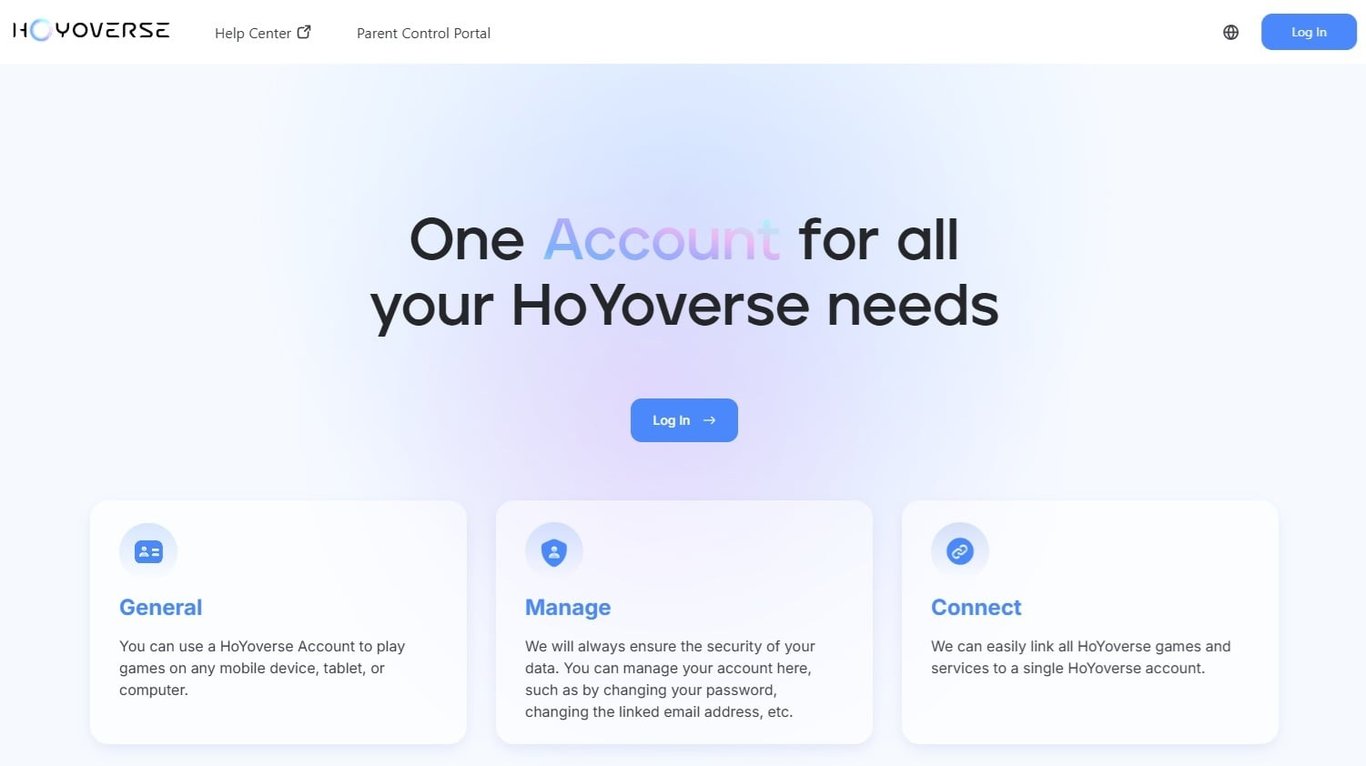
開啟 account.hoyoverse.com ,並登入你目前正在使用的遊戲帳號。

HoYoverse 網頁端帳號綁定入口介面

  1. 進入「個人資訊 / Personal Information」頁面。
  2. 找到「電子郵箱 / Email」欄位,點擊「綁定 / Link」。
  3. 輸入你想要綁定的電子郵箱地址,並取得驗證碼。
  4. 輸入驗證碼後,按照頁面提示設定帳號密碼。

完成後,該電子郵箱即可作為你的 HoYoverse 帳號登入方式使用。

綁定方法二:透過遊戲內個人中心綁定
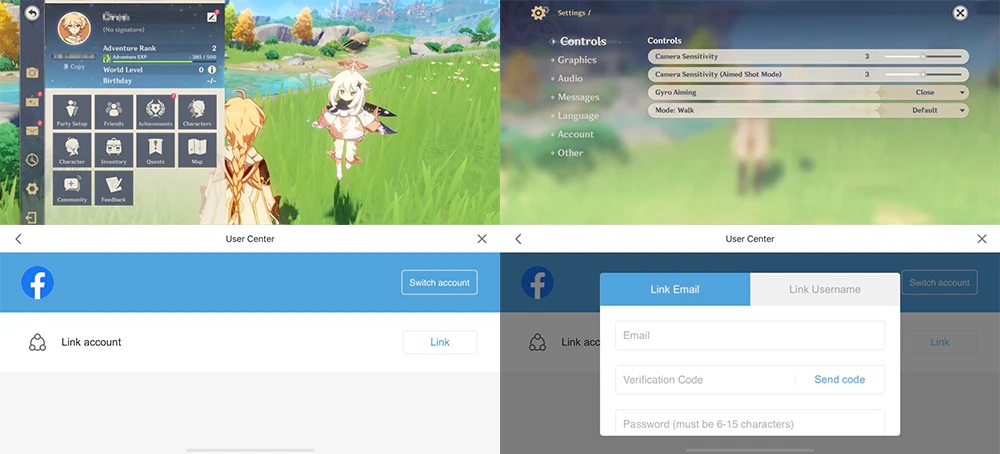
手機端 HoYoverse 帳號綁定教學介面

你也可以直接在遊戲內完成綁定。

原神:

打開派蒙選單 → 設定 → 帳戶 → 使用者中心

崩壞:星穹鐵道 / 絕區零:

打開選單 → 設定 → 帳戶 → 使用者中心

進入「使用者中心」後,找到「電子郵箱」欄位,點擊「綁定」,再依照提示輸入電子郵箱、驗證碼並設定密碼即可。

重要注意事項

出於帳號安全考量,電子郵箱一旦綁定,通常不建議頻繁更換,也可能受到系統限制。因此,請務必使用你本人長期可正常收信、且安全性較高的電子郵箱。

一個電子郵箱通常只能對應一個 HoYoverse 帳號。

如果該電子郵箱已經註冊或綁定過其他 HoYoverse 帳號,系統可能會提示該郵箱已被使用,這時應改用其他可用郵箱,或先確認該郵箱對應的是不是你的原帳號。

如果你目前仍在使用訪客帳號,請優先完成綁定。訪客帳號在裝置遺失、遊戲重裝、資料清除或系統異常後,找回難度很高,甚至可能無法恢復。

完成綁定後,請妥善保管你的電子郵箱、HoYoverse 帳號密碼與驗證方式。不要將驗證碼、密碼或帳號登入資訊提供給他人,以免造成帳號被盜或資產損失。

無論你遊玩的是原神、崩壞:星穹鐵道,還是絕區零,綁定 HoYoverse 電子郵箱帳號都是保護帳號安全的重要步驟。尤其是使用第三方登入或訪客模式的玩家,更應該盡早完成綁定,避免在換機、重裝遊戲或登入方式失效時失去帳號存取權。