🌀 Wuthering Waves 3.0: Deep Dive into the New "Tune Break" & "Off-Tune" Mechanics
 Avery Wilson


With the arrival of Version 3.0, Wuthering Waves has introduced a game-changing combat system that evolves the way we fight. This isn't just for new characters or regions—the Off-Tune Mechanic is a universal system that covers every Resonator and every enemy across the map.
Here is everything you need to know to master the rhythm of battle in 3.0.
I. The Core Cycle: Off-Tune Level & Mistuned State
The combat now revolves around a new "build-up and burst" cycle.
1. Off-Tune Level (The Gauge): Look at the left side of an enemy's HP bar. You will see a new gauge that fills up as you attack. This is the Off-Tune Level.

2. Mistuned State (The Trigger): Once the gauge is full, the enemy enters the Mistuned State. You’ll hear a distinct "clicking" sound, and the enemy's HP bar will show a shattered pattern.
3. Tune Break (The Execution): In the Mistuned State, you can cast a Tune Break skill. This deals Flat Damage, reduces the enemy's Vibration Strength (Toughness), and resets their Off-Tune Level.
Pro Tip: For "Rank 1" (Cost 1) enemies, Tune Break damage triggers automatically once the gauge is full. For elite enemies and bosses, you must trigger the skill manually.
II. New Combat Stats: Tune Break Boost
Version 3.0 introduces two critical stats that you should look for in Resonator attributes:
• Tune Break Boost: This is the primary stat for scaling. It increases the Flat Damage dealt by Tune Breaks and enhances damage against "Interfered" targets.
• Off-Tune Buildup Rate: This determines how quickly your attacks fill the enemy’s Off-Tune gauge. High efficiency means more frequent Tune Breaks.
Note: Pre-3.0 Resonators have a base Tune Break Boost of 0, while new 3.x characters like Lynae start with a base stat of 10.
III. Shifting Effects: Tune Strain vs. Tune Rupture
While all Resonators can perform a standard Tune Break, specialized 3.0 characters like Lynae can apply Shifting Effects to enemies during the buildup phase. Both effects lead to the Interfered State, but they function differently:
1. Tune Strain (Damage Scaling)
• How it works: This effect lets the Resonator deal significantly more damage to enemies in the Tune Strain - Interfered state.
• Lynae’s Specialty: Each point of Lynae’s Tune Break Boost increases her total DMG against these targets. She also increases the max stack limit of this effect.
2. Tune Rupture (Additional Attack)
• How it works: When a Tune Break is performed on an enemy with this effect, it triggers an additional coordinated attack.
• Lynae’s Specialty: She performs a unique follow-up called "Spectral Analysis", dealing extra damage every 8 seconds when any teammate triggers a Tune Break.
IV. Tactical Mastery: Boss "Red Glow" Attacks
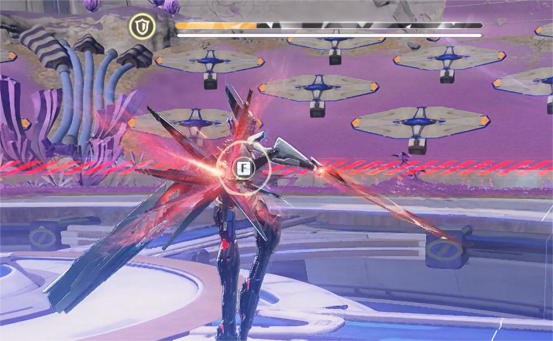
A key strategy for Version 3.0 is observing boss behavior. Many bosses now have Red Glow attacks. If you dodge or wait out these specific moves, the boss will temporarily enter a Mistuned State for a short window, allowing you to cast an instant Tune Break without building the gauge!
Summary: The New Meta
The Tune Break system adds a new layer to Wuthering Waves' high-speed combat. By balancing your Off-Tune Buildup Rate and maximizing your Tune Break Boost, you can effectively shut down enemy aggression while dealing massive bursts of flat damage.