";inherits:false;initial-value:#0000}@property --tw-gradient-via{syntax:"";inherits:false;initial-value:#0000}@property --tw-gradient-to{syntax:"";inherits:false;initial-value:#0000}@property --tw-gradient-stops{syntax:"*";inherits:false}@property --tw-gradient-via-stops{syntax:"*";inherits:false}@property --tw-gradient-from-position{syntax:"";inherits:false;initial-value:0}@property --tw-gradient-via-position{syntax:"";inherits:false;initial-value:50%}@property --tw-gradient-to-position{syntax:"";inherits:false;initial-value:100%}@property --tw-leading{syntax:"*";inherits:false}@property --tw-font-weight{syntax:"*";inherits:false}@property --tw-shadow{syntax:"*";inherits:false;initial-value:0 0 #0000}@property --tw-shadow-color{syntax:"*";inherits:false}@property --tw-shadow-alpha{syntax:"";inherits:false;initial-value:100%}@property --tw-inset-shadow{syntax:"*";inherits:false;initial-value:0 0 #0000}@property --tw-inset-shadow-color{syntax:"*";inherits:false}@property --tw-inset-shadow-alpha{syntax:"";inherits:false;initial-value:100%}@property --tw-ring-color{syntax:"*";inherits:false}@property --tw-ring-shadow{syntax:"*";inherits:false;initial-value:0 0 #0000}@property --tw-inset-ring-color{syntax:"*";inherits:false}@property --tw-inset-ring-shadow{syntax:"*";inherits:false;initial-value:0 0 #0000}@property --tw-ring-inset{syntax:"*";inherits:false}@property --tw-ring-offset-width{syntax:"";inherits:false;initial-value:0}@property --tw-ring-offset-color{syntax:"*";inherits:false;initial-value:#fff}@property --tw-ring-offset-shadow{syntax:"*";inherits:false;initial-value:0 0 #0000}@property --tw-outline-style{syntax:"*";inherits:false;initial-value:solid}@property --tw-blur{syntax:"*";inherits:false}@property --tw-brightness{syntax:"*";inherits:false}@property --tw-contrast{syntax:"*";inherits:false}@property --tw-grayscale{syntax:"*";inherits:false}@property --tw-hue-rotate{syntax:"*";inherits:false}@property --tw-invert{syntax:"*";inherits:false}@property --tw-opacity{syntax:"*";inherits:false}@property --tw-saturate{syntax:"*";inherits:false}@property --tw-sepia{syntax:"*";inherits:false}@property --tw-drop-shadow{syntax:"*";inherits:false}@property --tw-drop-shadow-color{syntax:"*";inherits:false}@property --tw-drop-shadow-alpha{syntax:"";inherits:false;initial-value:100%}@property --tw-drop-shadow-size{syntax:"*";inherits:false}@property --tw-backdrop-blur{syntax:"*";inherits:false}@property --tw-backdrop-brightness{syntax:"*";inherits:false}@property --tw-backdrop-contrast{syntax:"*";inherits:false}@property --tw-backdrop-grayscale{syntax:"*";inherits:false}@property --tw-backdrop-hue-rotate{syntax:"*";inherits:false}@property --tw-backdrop-invert{syntax:"*";inherits:false}@property --tw-backdrop-opacity{syntax:"*";inherits:false}@property --tw-backdrop-saturate{syntax:"*";inherits:false}@property --tw-backdrop-sepia{syntax:"*";inherits:false}@property --tw-duration{syntax:"*";inherits:false}@property --tw-ease{syntax:"*";inherits:false}@property --tw-scale-x{syntax:"*";inherits:false;initial-value:1}@property --tw-scale-y{syntax:"*";inherits:false;initial-value:1}@property --tw-scale-z{syntax:"*";inherits:false;initial-value:1}@keyframes pulse{50%{opacity:.5}}
keygold logo
日本語
ログイン / 登録
keygold invite coupon新規登録ユーザー限定登録で割引クーポンを受け取る
ホームkeygold arrow-rightブログkeygold arrow-rightクラッシュ・ロワイヤル 最新コード(2026年1月)|有効・使用可能
keygold search

クラッシュ・ロワイヤル 最新コード(2026年1月)|有効・使用可能
keygold blog author佐藤 悠真
2026/01/26
keygold facebook sharekeygold reddit sharekeygold twitter sharekeygold whatsapp share
keygold link

無駄な出費をせずに、クラッシュ・ロワイヤルをもっと楽しみたいですか?
クラッシュ・ロワイヤルの引き換えコードを使えば、公式キャンペーンで配布されている無料エモートや装飾アイテムを入手できます。

このページでは、現在使用可能な最新のクラッシュ・ロワイヤルコードに加え、分かりやすい引き換え手順や、スムーズに受け取るための実用的なポイントをまとめています。

本ページは、公式に公開された情報やコミュニティで確認されている状況をもとに、最新の状態を保つよう更新されています。

有効なクラッシュ・ロワイヤル コード

以下は、現在引き換え可能なクラッシュ・ロワイヤルの公式コードです。
有効期間中は Supercell Store から引き換えることができます。

  • FIREANDICE!!(新)

  • TRUSTYTURRET

  • WHENHOGSFLY!

  • REINABARRIGA

⚠️ コードには有効期限があります。入手したら早めの引き換えをおすすめします。

クラッシュ・ロワイヤル ギフトコードの引き換え方法

クラッシュ・ロワイヤルのコードは、公式の Supercell Store から引き換えます。以下の手順に従ってください。

  1. デバイスで「クラッシュ・ロワイヤル」を起動

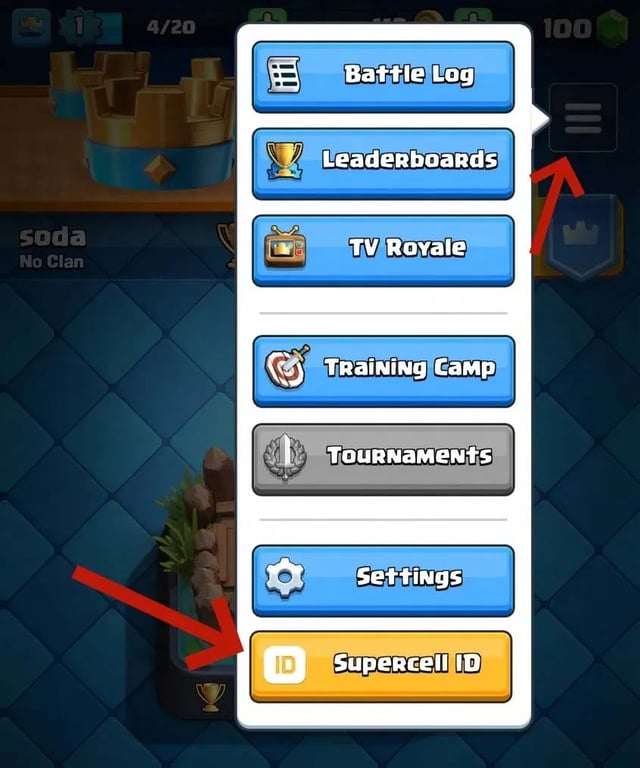
  2. 右上の「メニュー」をタップし、Supercell ID が連携されていることを確認

    wuwa.jpg

  3. Supercell Store の「クラッシュ・ロワイヤル」ページにアクセス

  4. Supercell ID でログイン

    wuwa-code.jpg

  5. 「ストアコードを引き換える」セクションまでスクロール

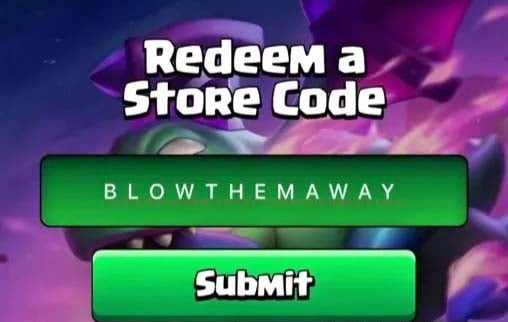
  6. コードを入力し、「送信」をクリック

引き換えに成功すると確認メッセージが表示され、次回ゲーム起動時に報酬が反映されます。

期限切れのクラッシュ・ロワイヤル コード

以下のコードはすでに無効となっています。

  • BLOWTHEMAWAY

  • ANGRYFURNACE

  • FIREFIREFIRE

  • ONEMAGICGIFT

  • SHARETHEGOLD

※ 混乱を避けるための参考情報として掲載しています。

引き換え時の注意点

コード入力時のトラブルを避けるため、以下の点にご注意ください。

  • ⚠️ 多くのコードは有効期間が短いため、早めに使用してください

  • ⚠️ 大文字・小文字や記号を正確に入力してください

  • ⚠️ コピー&ペースト時の余分な空白に注意

  • ⚠️ 一部のコードは特定のサーバーでのみ使用できる場合があります

自分のペースで楽しもう

引き換えコードは、無料でエモートや装飾アイテムを入手できる手軽な方法です。その先のプレイスタイルや進行ペースは、すべてあなた次第です。

このページは、新しいクラッシュ・ロワイヤルコードが公開され次第、随時更新されます。ぜひブックマークして、定期的にチェックしてください。