Roblox Top Up
Roblox Top Up
5.079 evaluations

Invite Friends
Win more coupon rewards
500 RBX
$3.93
$4.99-$1.061000 RBX
$7.84
$9.99-$2.152000 RBX
$15.67
$19.99-$4.324500 RBX
$38.13
$49.99-$11.8610000 RBX
$82.22
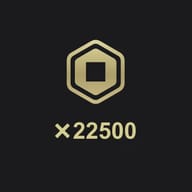
$99.99-$17.7722500 RBX
$174.44
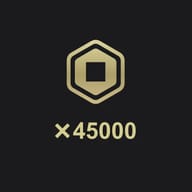
$199.99-$25.5545000 RBX
$358.88
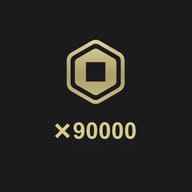
$399.98-$41.190000 RBX
$727.76
$799.96-$72.2


Related News


Top-up Instructions
Saving up for a game pass in Blox Fruits, a rare pet in Adopt Me!, or a fresh fit for your next Brookhaven roleplay? It all runs on Robux. KeyGold's Roblox top-up adds Robux straight to your account for less than the official Roblox store price, and checkout supports major global payment methods plus local payment options in many countries.
Top-Up Method: Login Top-Up
This is a login top-up. Once your payment is confirmed, our team signs in to your Roblox account, purchases the exact Robux package you ordered, and signs out. No third-party tools, scripts, or modified clients are ever used.
What we need from you:
- Roblox username or account email
- Roblox password
- Display name
Double-check every field before you submit, and make sure your account isn't banned, restricted, or locked. Wrong or outdated login details are the #1 reason a Robux top-up gets delayed.
Delivery Time
Most Robux orders are completed within 60 minutes after you submit your account details. The clock starts as soon as your info comes in, so fill out the form right after checkout to get your Robux faster.
How to Top Up Robux on KeyGold
- Pick your Robux package and pay. Choose the amount you want and check out with your preferred payment method.
- Submit your account details. Fill in the account info requested on your order page.
- We top up your Robux. Our team signs in and buys the exact Robux package matching your order.
- We sign out and clear the session. Once the Robux is credited, we log out and clear all login records on our side.
- Check your balance. You'll get a completion notice. Log in to Roblox and confirm your new Robux balance.
Where to Find Your Roblox Username and Display Name
On a computer: log in to Roblox, click the gear icon in the top-right corner, then go to Settings → Account Info.
On the mobile app: tap More → Settings → Account Info.
Your Username and Display Name are both listed there. Enter them exactly as shown, including capitalization.
Keep Your Account Safe
- Your login details are used only to complete this order. KeyGold doesn't store or share them.
- We sign out and clear all login records as soon as your Robux is delivered.
- Change your Roblox password once you've confirmed your new Robux balance.
- Only submit account details through your KeyGold order page, and ignore anyone offering "free Robux" in exchange for your login.
- Questions about your order? Our 24/7 support team can check on it anytime.
Disclaimer
KeyGold is an independent online store for game top-ups and digital goods. KeyGold is NOT endorsed by, affiliated with, maintained by, authorized by, or sponsored by Roblox Corporation or its trademark owner(s). All trademarks and registered trademarks are the property of their respective owners.
What Is Roblox?
Roblox is an online game platform and creation system built by Roblox Corporation. Instead of offering a single game, it hosts millions of player-made experiences, and one account gets you into all of them. In 2026 the biggest hits include Brookhaven RP, Blox Fruits, Adopt Me!, Grow a Garden, Rivals, Steal a Brainrot, and 99 Nights in the Forest, spanning roleplay, anime fighting, simulators, shooters, and survival.
Whatever you're into, one thing ties it all together: Robux, the currency behind almost everything worth unlocking.
What Is Robux?
Robux is Roblox's official virtual currency. You can earn it or buy Robux with real money, and most players look for the route that gives them the most Robux per dollar. That's why a discounted Robux top-up is so popular compared with paying full price in the app.
What Can You Buy With Robux?
- Avatar items: hats, hair, emotes, bundles, layered clothing, and limiteds.
- Game passes: permanent perks inside a specific experience, like extra storage, faster progress, or VIP areas.
- Developer products: one-time buys such as in-game currency packs, spins, or revives.
- Private servers: your own server to play with just your friends.
- Creator support: every purchase helps fund the developers building the games you love.
Good to Know Before You Buy
When you buy Robux, you're getting a license to use a virtual currency inside Roblox. Robux has no cash value outside the platform, and under Roblox's terms it is non-refundable, non-transferable, and revocable. Buy the amount you actually plan to spend.
How Much Do Robux Cost in 2026?
Official Robux prices depend on where you buy. Roblox sells packages from $4.99 up to $199.99, and bigger packages give you more Robux per dollar. Platform matters too: buying in the iOS or Android app gets you fewer Robux than buying the same package on the Roblox website or with a gift card, because app stores take a cut.
KeyGold prices every package below the official Roblox store rate, so your budget goes further. Wondering how much 1,000 Robux costs, or comparing bulk bundles? The exact price of every package is listed on this page before you check out.
Roblox Premium vs Roblox Plus: What Changed for Robux Buyers
On April 30, 2026, Roblox stopped selling Premium to new members and launched Roblox Plus. Existing Premium members can keep their plan and its monthly Robux stipend, but the extra 10% bonus on Robux purchases ended on May 30, 2026.
The base Roblox Plus plan doesn't include monthly Robux. Its perks focus on savings and features such as fee-free Robux transfers, and Roblox has announced Plus bundles that add 500, 1,000, or 2,000 Robux a month at a higher price. For most players, the simplest way to get exactly the Robux you need is now a direct top-up.
Robux Top-Up vs Roblox Gift Card: Which Is Better?
Both get Robux into an account, but they work differently and suit different situations.
| Robux Top-Up | Roblox Gift Card | |
|---|---|---|
| What you get | Robux added straight to your account | A code you redeem for account credit |
| How it works | We handle it, no code to enter | You redeem it on Roblox yourself |
| Account details needed | Yes, to deliver to your account | No |
| Best for | Topping up your own account fast | Gifts, or redeeming later |
Choose a Roblox top-up when you're buying for yourself and want Robux credited directly. Choose a gift card when it's a present, or when you'd rather hold the code and redeem it later.
How to Get Robux: 4 Ways Compared
1. The Official Roblox Store
Available on the website, mobile, Xbox, and PlayStation. It's the most obvious option but rarely the cheapest, and buying inside the mobile app gets you fewer Robux for the same money than buying on the web.
2. Roblox Gift Cards
Sold online and at retailers like Walmart, Target, and GameStop. Great as a gift, though you still need to redeem the code yourself before the Robux shows up.
3. A Trusted Robux Top-Up Store Like KeyGold
This is where players hunting for cheap Robux usually end up. KeyGold prices its Robux packages below the official store rate, so the same budget gets you more Robux. Checkout supports major global payment methods and local payment options in many countries, so you can complete a Roblox recharge wherever you play.
4. Earning Robux on Roblox
Creators can earn Robux by selling avatar items, game passes, or developer products. With Premium closed to new members, the old monthly stipend is no longer an option for new players, so earning is a slow route if you want a specific item this week.
Is It Safe to Buy Robux From KeyGold?
It's smart to ask. Most Robux scams are fake "free Robux" generators and sellers who ask for your login in DMs. KeyGold works differently: you pay through a secure checkout, you enter account details only on your order page, and those details are used solely to deliver your order. Login records are cleared once delivery is done, every order comes with order protection, and our support team is available 24/7 if anything looks off.
Two habits keep you safe on any platform: change your Roblox password after your Robux arrives, and never share your account details anywhere except the official order page.
Why Buy Robux on KeyGold?
Lower Robux Prices
Every package costs less than the official store rate, and regular promotions widen the gap. On a mid-size package, the savings can go a long way toward your next game pass.
Secure Checkout, Global Payments
KeyGold supports major global payment methods and local payment options in many countries, so paying is quick no matter where you play from.
Fast Delivery
Delivery starts as soon as your payment clears and your account details are in, so you're back in the game fast instead of waiting in a queue.
24/7 Customer Support
Questions about orders, payments, or delivery? Our team is online around the clock, in every time zone.
Which Robux Package Should You Buy?
Smaller packages are perfect for a first game pass, a new outfit, or a one-off item. They're also an easy way for parents to stick to a set monthly budget. Larger packages give you more Robux per dollar and make sense if you play across several experiences or want Robux ready for the next limited drop or seasonal event. Not sure? Start small. Robux stays in your account until you spend it, so you can always top up again.
View FAQ
Reviews & Ratings
5.0
79 evaluations
- 2026/01/11
G1767904827642
It literally came in 5 minutes, it is faster AND cheaper then anywhere else.
2000 RBX - 2026/09/09
G1780538636072
Good as alyaws, keep going like that
500 RBX - 2026/09/07
G1780538636072
Fast, and the client support is good as always
500 RBX - 2026/07/27
G1785121584506
It did take a while, but that's understandable since they're real people. I wasn't sure about it at first, but the support team was helpful and patient. 10/10
500 RBX - 2026/07/17
G1779514621780
Parfait 20/20
2000 RBX